- home
-
Products
- Products
- Metrici Custom Applications
- Metrici LPR
- Metrici LPR Parking Module
- Metrici LPR Toll Station Module
- Metrici LPR Weighing Module
- Metrici PPD
- Metrici Area Counter
- Metrici Line Counter
- Metrici QR Code Reader
- Metrici Container Code Recognition
- Metrici Thermal Analyzer
- Metrici Parking Terminals
- Metrici Smart ID Scan
- Metrici Car Kit
- Metrici Server Systems
- Metrici Observer Radar
- Metrici LED Display
- Metrici MultiController
- Metrici LAN Controller
- case studies
- Applications
- Resources
- news
- videos
- Contact
AI Solutions for Residential Management
Smart Residential Management.
From vehicle access to
community monitoring.
Connected access. Smarter parking. Better-managed communities.
Metrici turns the IP cameras at your gates, parking areas and shared facilities into structured operational information: recognised vehicles at the barrier, recorded visitors at the gatehouse, free and occupied parking places, activity in common areas. One platform for the property administrator and the security team, instead of five systems that do not talk to each other.
License plate access control
Visitor records at the gatehouse
Parking place occupancy
Common-area and perimeter alerts
Runs on your infrastructure
Who this is for
Three buyers, one operational picture
The same cameras, the same database and the same interface serve each of them — what changes is which questions they ask of it and what they are accountable for.
Residential developers and property managers
You hand over buildings, basements and gates that have to work from day one, then operate them for years. Access permissions, parking allocation and shared facilities are the daily workload — and the first thing residents notice when they do not.
Homeowners' associations and administrators
You answer for the gate, the basement and the visitor who arrived without notice. You need records you can point to — who entered, when, which place was used — and a way to see how the community's shared spaces are actually being used.
Security companies and system integrators
You are asked to deliver more than cameras on a wall: verifiable access decisions, monitored rules, alerts with evidence behind them. Metrici gives you the analytics layer and the control and display hardware to integrate, with documentation and support behind it.
The challenge
A residential community is an operations site that nobody staffs like one
Hundreds of residents, a rotating stream of visitors, couriers and tradespeople, a basement that fills up at 7pm, amenities shared by everyone and rules enforced by whoever is on shift. Most of it is managed from memory, a paper list and a phone call.
Access is either loose or slow
Residents, visitors, delivery drivers and service providers all need different permissions, and the gate cannot tell them apart. Guards check plates against a printed list, or lift the barrier on sight. Either the queue grows at 8am, or the record of who came in is whatever the guard remembers writing down.
The parking is full, but nobody knows where
Assigned places are sold or allocated on a spreadsheet; visitor places are found by driving around. Whether a place is being used by the right vehicle, held for days, or taken over by a second car in the family is settled by a walk through the garage and a dispute afterwards.
Visitor handling runs on several disconnected steps
A visitor is announced by phone, stopped at the gate, ID-checked by hand, given a place to park and signed out — or not. Each step lives somewhere else: the intercom, a notebook, the barrier log. Reconstructing one visit means asking three people.
Shared spaces are managed blind
The pool, gym, playground and meeting rooms carry rules, capacity limits and opening hours, and a cost whether they are used or not. Today their real usage is estimated — which makes both crowding and waste invisible until someone complains.
The systems in place were each bought for one job
The camera recorder, the barrier, the intercom, the parking lock and the visitor notebook each keep their own truth. Nothing links the plate at the gate to the visitor in the lobby, or the car in place 214 to the person who holds that lease. So the administrator becomes the integration layer: repeating the same question to four systems and a guard, and still closing the month without a defensible record of what happened on site.
The Metrici solution
Connect access, parking and community monitoring
Metrici's AI engines read standard IP camera streams and turn them into structured data: recognised plates, counted people and vehicles, the state of each monitored parking place, and events raised against rules the administrator configures. They run side by side on one server, write to one database and are used through one interface — the Metrici Interface — so residential access control, parking management and community monitoring are operated as a whole instead of one system at a time.
01
Vehicle access management
LPR reads plates at the entrances and exits and checks them against the access lists you configure — residents, employees, authorized contractors, temporary permits. The barrier or indicator is driven through supported controllers, and every attempt is recorded either way.
- Separate permissions for residents, visitors and service providers
- Barrier, LED and indicator control through supported hardware
- Time-stamped access records with image attached
Engines: LPR · LPR Parking Module · LAN Controller · MultiController
02
Visitor management
Visitors and service providers are registered at the controlled point. Smart ID Scanner & Reader extracts data from supported identity documents, the Visitor Journal holds the record, and where configured the visitor's vehicle plate is linked to it so the gate recognises the same person later.
- Structured records instead of a paper visitor book
- Permissions and approval steps per configured workflow
- Searchable history: who, when, invited by whom, which place used
Engines: Visitors Journal · Smart ID Scanner & Reader · LPR · API
03
Parking management
Parking Place Detector watches a deck, row or yard from above and reports each place as free or occupied, continuously. Combined with LPR it covers allocated places, visitor areas and configurable parking rules — occupancy becomes a measured fact rather than a patrol report.
- Free and occupied places per area, level or deck, live
- Assigned-place and visitor-area conditions monitored against your rules
- Availability published to connected LED displays where supported
Engines: PPD · LPR · LPR Parking Module · LED Display
04
People and vehicle counting
Line Counter counts directional crossings at doors, gates and routes; Area Counter reports how many people or vehicles are inside a defined zone at any moment and for how long. Together they describe access flow and amenity use with the same engines and the same reports.
- Entries and exits per access point, per hour, per day
- Occupancy and dwell for pools, gyms, rooms, playgrounds, lobbies
- Trends for staffing, opening hours and facility planning
Engines: Area Counter · Line Counter · Metrici Interface
05
Security event monitoring
Detection runs against what you configure: presence in a restricted zone, movement at a perimeter segment outside defined hours, a queue of vehicles at the gate, occupancy above a set number. Alerts reach the security desk while the event is happening, and the images stay attached to the record for review.
- Configured rules per camera, zone and time window
- Alerts to the desk while the event is in progress
- Event archive with images — reviewable, exportable
Engines: AI video analytics · LPR · Area Counter · Line Counter
06
System integration
Metrici sends its events out as they happen and reads commands back in, so barriers, displays, access controllers, visitor systems and your own software can act on what the cameras see. Where a device speaks a supported interface, it joins the platform instead of sitting next to it.
- HTTP POST / JSON event push and REST interfaces
- Relay and controller outputs for barriers, signage and indicators
- Direct SQL access, scheduled CSV, XLS and PDF exports
Modules: API integrations · LAN Controller · MultiController · custom development
| What the community needs | Metrici AI on compatible cameras | Manual gatehouse and patrols | Separate single-purpose systems |
|---|---|---|---|
| Vehicle access at the gate | Automatic plate recognition against configured lists, barrier released on a match, attempt logged either way | Visual checks against a list; slow at peak hours; gaps between shifts | Works at its own barrier only; no image and no link to visitor or parking records |
| Parking places | Every monitored place reported free or occupied, live, per area or level | Walked and counted when someone has time; no history kept | Sensors per place, wiring per place, one vendor per subsystem |
| Visitors | Document data captured at the point of entry, plate linked, record searchable | Handwritten book; legibility and completeness depend on the guard | A visitor app or terminal that the gate, the barrier and the garage cannot see |
| Common areas and amenities | Occupancy, dwell and flow per zone, with history for planning | Estimated by eye | Usually not covered by any system |
| After an incident | Events, images and access records in one archive, filtered by time, camera, plate or zone | Reconstructed from testimony and hours of footage | One export per system, different time bases, no common key |
| Covering one more entrance or building | Add a camera and an engine licence to the same database and interface | More hours, more guards, more notebooks | A new project, a new contract, a new console |
Scroll the table sideways →
Applications
Where a residential community starts, and what it grows into
In the order most sites deploy them: first the vehicle gate, because that is where the daily friction and the daily risk both sit; then the parking; then the visitor desk; then the shared spaces; then the perimeter. Each one runs on cameras and a server, not on new staff.
01
Automated vehicle access control
The camera at the gate reads the plate as the vehicle approaches and checks it against the lists you maintain — residents, family cars, staff, authorised contractors, temporary permits, denied plates. When the conditions you configured are met, a supported controller releases the barrier; when they are not, the attempt is recorded the same way. Residents stop waiting for a guard to recognise them, and the community stops relying on the guard recognising them.
- Plate recognition at vehicle entrances and exits, in motion, day and night
- Separate access lists for residents, visitors, staff and service providers
- Barrier, boom, bollard or indicator control through supported controllers
- Time-stamped access record with plate, image and camera for every passage
- Second cars, changed plates and revoked permits handled in the list, not at the gate
Live at Cortina Residence — one gate, two Axis P1425 LPR cameras, 426 parking places serving 270 apartments
Engines: Metrici LPR · LPR Parking Module · LAN Controller · MultiController
02
Residential and visitor parking management
An overhead camera covers a row, a deck or a yard and reports every place it can see as free or occupied, all day. Layer the plate on top and the picture sharpens: who is in the place, how long they have been there, whether the place is theirs to use. Smart residential parking is mostly that — knowing what the community owns and how it is being used. Visitor areas stop being the overflow of last resort, and allocated places stop being argued about.
- Free and occupied places per level, row, area or gated section, live
- Allocated-place and visitor-area conditions checked against your rules
- Long-stay and repeat-occupation situations surfaced for review
- Availability shown on connected LED displays at the entrance and in the deck
- Occupancy history for allocating new places and planning a second gate
Parking rule monitoring raises configured situations as alerts for the administrator or the security desk to act on. Metrici does not issue fines and does not decide penalties; the record it produces is evidence a person reviews.
Related implementation Hermes Business Campus — whitelist parking access across four access points serving around 30 tenants, the same multi-party model a multi-building residence needs
Engines: Metrici PPD · Metrici LPR · LPR Parking Module · LED Display
03
Visitor and service provider management
The gatehouse stops being a transcription exercise. The document is presented, its data captured — by Smart ID Scanner & Reader where configured, or by the operator — and the visit is written as one record: who arrived, for whom, with which vehicle, at what time, with the image attached. Delivery drivers, cleaners, tradespeople and care providers can be covered by their own rules instead of a general instruction to “let them in”.
- Structured visitor records replacing a paper book or a spreadsheet
- Document data extracted from supported ID cards, passports and licences
- Visitor linked to the plate they arrived on, so the gate recognises the visit
- Pre-approved lists, host approval and denial handled per configured workflow
- Search by name, document, host, plate, date or gate for later review
Which fields are captured, who may see them and how long they are kept are configuration decisions the administrator makes. The Visitors Journal is built for the access-desk use case; the fields it records are set for each deployment.
Engines: Metrici Visitors Journal · Smart ID Scanner & Reader · Metrici LPR · API integrations
04
Common area and occupancy monitoring
The pool, the gym, the clubhouse, the playground, the bike room, the lobby. Area Counter reports how many people are inside such a zone now and for how long; Line Counter counts directional crossings at its door or along its route. Occupancy becomes a number you can staff, schedule, price and open on the basis of, and usage patterns over weeks become a document instead of an impression.
- Occupancy and dwell per amenity, room, terrace or play area
- Directional entries and exits per access point and per hour
- Alerts when a configured occupancy figure is reached or exceeded
- Usage over time for opening hours, cleaning rounds, staffing and investment
- Aggregate figures — counts of people, not identities of residents
Engines: Metrici Area Counter · Metrici Line Counter · Metrici Interface
05
Perimeter and security event monitoring
Fence lines, service gates, bike stores, basement ramps, the side of the building. Detection runs on rules you set — presence in a defined zone, crossings outside configured hours, a vehicle waiting at a service gate, a count above a figure. The alert reaches the security desk with the image while there is still time to send someone, and the event stays in the archive.
- Monitored zones, lines and access points, each with its own rules
- People and vehicle detection against time windows you configure
- Alerts to dashboard, email or other supported channels
- Event records with associated images for review and handover
- Connection to external security systems where an interface exists
These are configured detections, not judgements. The system does not decide that behaviour is suspicious and does not identify people by face; a person at the desk reviews every alert and decides what it means.
Engines: Metrici AI video analytics · Metrici LPR · Area Counter · Line Counter · integrations
Under all five: one database, one interface, one set of records
This is the part a bundle of single-purpose products cannot reproduce. The plate at the gate, the visitor at the desk, the car in place 214, the twelve people in the gym and the movement at the service gate are written to one Metrici database, each with its time, camera and image. One operator sees them in one interface with permissions set per role and per site; one retention policy covers them; and they leave the platform through one integration surface — HTTP POST / JSON as they happen, direct SQL, or scheduled CSV, XLS and PDF exports — into the property-management, ticketing or BI system you already run. Adding a gate, a deck or a building adds a camera and an engine licence to the same system rather than starting a separate project.

What one gate returns
A queue becomes a log
Before, a gate produced passage and opinion: it opened, it did not open, someone remembers a car being let in. After, the same gate produces a record per event, and that record answers the questions an administrator actually gets asked — without a search through video.
- “Who was in the basement at 02:40 on Sunday?” — filter the archive by time and camera
- “Did we authorise that contractor?” — the entry and the list it matched are both logged
- “Why is the morning queue long?” — reads, rejections and dwell per lane, per hour
What one deck returns
Occupancy without walking it
Parking Place Detector was built for car parks where each bay has to be accounted for, which is exactly the condition of a residential garage with allocated places and a handful of visitor spaces. One elevated camera covers the row it is positioned over and reports each place it sees, continuously, so the state of the deck is known from the office or the desk rather than from a walk.
- Per-place state, not an average occupancy percentage
- Same engine across garage, surface lot and visitor area
- Turnover and dwell that justify allocating more places, or fewer


Supporting applications
Three more things the same cameras can cover
Not the reason to deploy, but useful where the site needs them — each one added as engines on the existing platform, and each one scoped to what it actually does.
Waste and recycling areas
Metrici has implemented recognition solutions around bins and waste containers — identifying the container class and where it is placed, at a camera position covering the enclosure or the collection point. For a community that means evidence in a collection dispute and a factual basis for changing where containers are kept.

Scope: recognition and recording at configured camera positions. Bin levels, collection scheduling and logistics remain with the waste contractor.
Engines: Object recognition · Line Counter · Area Counter
Temperature threshold alerts
With a thermal camera in position, Metrici Thermal Analyzer measures temperature for objects and zones in the frame and raises an alarm when a threshold you set is crossed — a transformer cabinet, a charging bank in the garage, a bin store in August, a technical room. Readings are logged, and the thermal and visual images are saved together for every event.
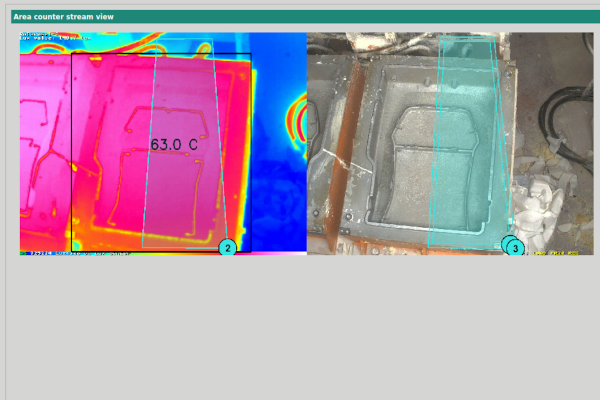
Scope: temperature measurement against configured thresholds on thermal camera feeds. It is an early signal for the security or facilities team — not a fire detection or fire alarm system, but it can notify the fire service, if configured.
Engines: Metrici Thermal Analyzer
Support during an emergency
When something happens, the platform is already counting: how many people are in the lobby, the gym or the basement, which vehicles passed which gate and when, which images belong to which minute. That is materially better information for the people responding than a guess, and it needs no separate system to produce it.

Scope: monitoring and records that support a response. Metrici does not run evacuation, does not perform people accounting, and does not replace the procedures, signage and drills a community is required to have.
Engines: Area Counter · Line Counter · Metrici LPR · event archive
Benefits
Better visibility, and less administration to produce it
A residential community does not buy analytics for their own sake. It buys them because the gate takes time, the basement generates complaints, the visitor book generates nothing at all, and the month closes without records anyone can rely on.
Day-to-day outcomes
More efficient access
Routine vehicle checks are handled by the configured permission instead of by a person: residents and authorised vehicles pass without stopping for a document or a phone call, and the guard's attention goes to the cases that genuinely need a decision.
Better parking control
You see which monitored places are free and which are occupied, on which level, right now — and which have looked the same for eleven days. Allocation, visitor areas and rule situations become a management decision instead of a dispute in the lift lobby.
Easier visitor administration
One structured record per visit replaces the notebook. Each tenant in the system has its own visitor access code that can be shared with his visitors, with a configurable using time.
Improved operational visibility
Movement and occupancy in the areas you define, over the hours you care about. The board gets a usage chart instead of an impression, and the manager can say which entrance carries the morning and which amenity is never used.
Administrative and commercial outcomes
Faster incident reviewEvents, access records and their images are searchable by time, camera, plate or zone — not reconstructed from footage and recollection.
Integrated operationsAnalytics, barrier, display and visitor records work together and connect to the access and management systems already on site, where an interface exists.
Scalable deploymentStart at one gate or one deck. Extra entrances, buildings and amenities join the same database and interface as licences are added.
Records that hold upA consistent, time-stamped trail for disputes with a resident, a contractor, a delivery firm or an insurer — with retention set by policy rather than by the recorder's disk size.
What this page deliberately does not promise
No facial recognition and no biometric identification of residents or visitors. No tracking of an individual resident's movement through the community. No automatic judgement that behaviour is suspicious — the system detects what it has been configured to detect, and a person decides what it means. No automated fines or penalties. No fire detection certification, fire alarm function. No resident-facing portal or community app. No predictive maintenance of the community's plant.
And no claim that a safer community comes guaranteed, or that security personnel become unnecessary. Metrici gives the people who manage a site better information and better records, and more reliable routine checks. Judgement, response and responsibility stay with them.
How it works
From camera feed to action, in four steps
Nothing here is speculative hardware. Compatible cameras already on the network carry the video; Metrici engines read it on a server you control; the result appears in one interface and can leave it as a signal, a record or a command.
CaptureExisting or new compatible IP cameras at entrances, parking areas, access routes and shared facilities.
AnalyseMetrici engines on site read the streams: plates, people, vehicles, crossings, parking states, configured rules.
ManageEvents, counts and alerts in the Metrici Interface, filtered by role, site and function.
Integrate and actBarriers, displays, controllers, visitor systems and your own software receive the event and respond.
1
Capture
Metrici reads standard IP camera streams — RTSP and ONVIF, from 2 MP to 4K. In most residential projects a substantial part of the existing camera estate qualifies; positions that matter for LPR usually need a purpose-mounted camera, and camera suitability is assessed per position during planning, before a licence is bought.
2
Analyse
Engines run on a Metrici server on site: LPR for plates, PPD for parking places, Area Counter and Line Counter for people and vehicles, event detection for zones and perimeters, Thermal Analyzer where a thermal camera is in position. Several engines can work on the same feed, and each is licensed per camera or per engine.
3
Manage
Everything lands in one interface: live state, event archive with images, access and visitor lists, counts and occupancy reports, alert configuration, system health. Users see the sites, functions and records their role allows, and what they change is logged.
4
Integrate and act
Metrici drives Metrici's own LAN Controller and MultiController for barriers, signals and displays, and publishes events over HTTP POST / JSON and REST for third-party access control, property-management and BI systems. Direct SQL and scheduled exports cover reporting that does not need to be real time.
On site
Processing and storage inside the community's own server room or the gatehouse. No video has to leave the property, and the gate keeps working through an internet outage.
Metrici server systemsOn-premises processingLocal databaseWorks offline
Your screens
The same interface in the administrator's office, on the security desk's console and on a wall display in the guard room, with permissions per role and per site.
Browser interfaceRole-based accessDashboardsAlert views
Your systems
Hardware you already own and software you already run: barriers, intercom, access control, LED signage, ticketing, property management, BI.
HTTP POST / JSONRESTRelay outputsDirect SQLCSV / XLS / PDF
A resident arrives at the gate
The same sequence runs at 07:40 on a Monday and at 03:00 on a Sunday, with or without anyone watching the monitor.
- ApproachThe camera captures the vehicle coming towards the barrier.
- RecognitionMetrici LPR reads the license plate from the frame.
- VerificationThe plate is checked against the access list configured for that gate and that time window.
- DecisionConditions met, a connected controller triggers the barrier; conditions not met, the vehicle is held and the desk sees why.
- RecordEntry event stored with plate, image, camera, lane and timestamp.
The whole sequence is a single logged event — the same record answers “did they get in?”, “when?” and “on whose authority?”
Real implementations
One residential deployment, and the related work beside it
Cortina Residence is a residential project with published numbers. The three below it are not residential — they are office, leisure and commercial deployments whose access problem has the same shape as a multi-building community's: many parties, allocated places, several entrances, one whitelist each. We label them as related implementations rather than passing them off as housing.
 Residential · Bucharest
Cortina Residence — plate access for 426 parking places
A 64,000 m² luxury complex near Herastrau Park in Sector 1: 270 apartments, 426 parking places and one vehicle gate into the underground garage. With many households owning more than one car, the developers required entry without queues and without compromising on security — and a record of every vehicle that went down the ramp.
Two Axis P1425 LPR cameras with low-pass filters read plates in motion at the barrier; Metrici checks each one against the resident whitelist, releases the barrier on a match, and logs the event with photo, timestamp and vehicle association. Families with several cars are supported by the list, not by an exception at the gate.
270 apartments426 parking places1 gate2 Axis P1425 LPR camerasMetrici Microsys 30 serverWinner, 2016 National Architecture Contest
Read the case study →
 Related · multi-tenant access
Hermes Business Campus — each tenant manages their own list
Three office buildings, four access points and over 30 tenants sharing underground parking. The requirement is the same one a multi-building residence eventually meets: everyone needs their own authorised vehicles, nobody wants to share a list with the neighbours, and the operator wants one system to administer.
Plates are read at each access point and checked against the whitelist of the relevant tenant; entry and exit are logged with photo, timestamp and tenant association, stay duration is tracked, and each tenant maintains their own whitelist and blacklist — including temporary guest access — through the Metrici interface.
30+ tenants4 access pointsPer-tenant whitelistsTemporary guest accessOne platform for the operator
Read the case study →
 Related · high-volume whitelist
Pescariu Sports & Spa — 1,500 members, two entrances
A membership club growing around 10% a year, where the barrier had to admit members quickly at peak hours without turning the entrance into a checkpoint, and without replacing the parking equipment already installed.
Four Axis P1425 cameras work with the existing Skidata parking barriers under Metrici LPR: registered members pass on the plate, the two entrances are covered by four licences on one Metrici Towersys 110 server, and the access record is the same record the operator reports from.
1,500+ members2 entrances4 Axis P1425 cameras4 LPR licencesExisting Skidata barriers kept
Read the case study →
 Related · open-site coverage
Expo Market Doraly — every entrance of 22 hectares
A commercial complex in Afumaç with 850+ companies, 26 pavilions and 3,000 free parking places, and no barriers anywhere — the condition under which nobody could say who had come, from where, or how often.
Eight LPR cameras cover all entrances and exits, served by a Metrici Racksys 240 server on site. Free-flow counting replaced the guesswork, and the same event database now supports custom reports on visit frequency and origin — the pattern a large gated community with no barrier at every path would follow.
22 hectares3,000 parking places8 LPR camerasNo barriersMetrici Racksys 240
Read the case study →
If you need a reference from a community like yours
Tell us the shape of your site — number of buildings, entrances, parking places, whether the garage has a barrier today — and we will tell you plainly which of these patterns transfers, which of our deployments is the closest comparable we can reference publicly, and where we would be quoting you from design rather than from a finished project. A scoping conversation costs nothing and usually ends with a camera-position drawing.
Products and integrations
The modules a residential deployment combines
Licensed per camera or per engine, all on one platform. Most communities start with LPR at the gate, add PPD for the deck and the Visitors Journal for the desk, and extend to counting, perimeter rules and thermal checks when the first results justify them.
Metrici LPR
Vehicle and license plate recognition for access management: reads in motion, front and rear, with an image attached to every read.
LPR Parking Module
Access rights, allocated places, subscriptions and reporting for resident, staff and visitor parking across the community.
Metrici PPD
Parking Place Detector: free or occupied status per place, row, level or yard, from one overhead camera position.
Metrici Visitors Journal
Structured visitor and access-desk records: who arrived, for whom, with which document and vehicle, at what time.
Smart ID Scanner & Reader
Identity document data extraction from supported documents — VIZ, MRZ and PDF417 — for visitor registration workflows.
Area Counter & Line Counter
Occupancy and dwell inside defined zones, and directional people and vehicle counts across virtual lines at doors and routes.
LED Display & controllers
Driver-facing information on Metrici LED displays, and barrier, relay and signal control through the LAN Controller and MultiController.
Metrici Thermal Analyzer
Temperature measured per object or zone on a thermal camera feed, with alarms when a threshold you set is crossed.
What Metrici connects to
Integration is scoped per site: if the device or platform exposes a supported interface, the analytics can act on it and be informed by it. Where it does not, we say so during planning rather than after the order.
Barriers and boomsGates and bollardsMetrici LAN ControllerMetrici MultiControllerThird-party access controlWiegand and RFID readersLED displays and signageSkidata and other parking systemsONVIF / RTSP camerasThermal camerasHTTP POST / JSONREST APIsDirect SQLCSV / XLS / PDF exportsEmail and SMS alertingProperty-management and BI platforms
Also part of the catalogue where a residential project needs them: Metrici Car Kit for mobile patrols, Metrici server systems, QR Code Reader and custom development for interfaces our standard modules do not cover.
Deployment, integration and data governance
A residential site handles other people's movements — it should be run accordingly
Vehicle access, visitor records and occupancy analytics touch residents, their guests, delivery drivers and contractors. These are the design decisions we settle with a client before go-live, and the ones a board will be asked about later.
On-premises deployment
Engines, database and interface run on a Metrici server inside the community's own infrastructure — tower, rack or edge box, sized to the number of cameras and engines. Video does not have to leave the property, and routine operation continues through an internet outage.
Camera compatibility assessed first
Standard RTSP and ONVIF streams from 2 MP to 4K. Whether an existing camera qualifies depends on position, resolution, lens, height, lighting and sightlines for the specific task, so each position is assessed during deployment planning — before licences are purchased, not after.
Integration scope, agreed per site
Barriers, access control, displays, ticketing and third-party software are listed with the client and checked one by one. Supported interfaces are used; where a device exposes no usable interface, that position stays manual and the plan reflects it.
Permissions per role and per site
Users see the sites, functions and records their role allows: a gate operator, an administrator, a board member and an integrator do not need the same view. Configuration changes are logged, so the question “who changed the access list?” has an answer.
Records, images and retention
Which events are kept, which images accompany them and for how long are configuration decisions, driven by the community's policy and storage. Exports and searches are limited by the same role permissions, and retention can differ between, say, an access log and a common-area count.
Notice, purpose and the controller's role
Residents, visitors and staff need to know monitoring exists, why, who sees it and for how long. Signage, internal rules, contracts with the security provider and the retention schedule sit with the administrator — the platform gives effect to those choices, it does not make them.
The line we want to be clear about
Metrici supplies technology and configuration options. The residential developer, administrator or property manager — the data controller — remains responsible for defining a lawful purpose for each application, the access policy, the notice given to residents and visitors, the retention period, and the assessment the processing calls for. Installing video analytics does not by itself make a deployment GDPR-compliant, and we will not tell a client that it does.
Practically, this is why we recommend starting with vehicle access and parking — data about vehicles and places — and treating people-related analytics as a separate, deliberate decision with its own documented purpose.
Questions administrators ask
Five answers we would rather give here than in a quote
These five come up in almost every residential conversation, and two of them are about what the system does not do. Better to answer them on the page than to discover the difference after an order.
01Does Metrici replace the guard house or the security company?
No. Metrici automates routine checks and records what happened, so the people managing the site spend their attention on exceptions. Detection, alerts and access decisions run against rules the administrator configures, and alerts are reviewed by the security team the community already employs or contracts.
02Does the system recognise faces or track individual residents?
No. The residential applications work with vehicles, plates, documents presented at a controlled point, and anonymous counts of people and occupancy in defined areas. Facial recognition and biometric identification are not part of this solution, and Metrici does not recommend configuring analytics for individual resident tracking.
03Can we use the cameras already installed in the community?
Often yes. Metrici reads standard RTSP and ONVIF streams from 2 MP to 4K cameras. Suitability depends on the position, resolution, lens, mounting height, lighting and sightlines of each camera relative to the task, so camera suitability is assessed during deployment planning before any licence is bought.
04Who is responsible for GDPR compliance in a residential deployment?
The residential administrator, developer or property manager — the data controller — remains responsible for defining the lawful purpose, the access policy, the notice to residents and visitors and the retention period. Metrici provides the technology and the configuration options that support those choices, including on-premises deployment, role-based access, retention settings and audit trails; installing video analytics does not by itself make a deployment GDPR-compliant.
05Can we start with one entrance or one parking area?
Yes. Most residential deployments start with the main vehicle entrance or the underground garage and extend to additional gates, buildings, amenities and shared areas later. Engines are licensed per camera or per engine, and added positions join the same database and the same interface, so an extension is not a migration.
A question of your own? Put it in the demo request or call +40 742 880 099.
Next step
Bring smarter access and parking management to your community
Whether you manage a gated development, a multi-building complex or a large residential community, Metrici can connect vehicle access, visitor management, parking occupancy and video analytics in one integrated solution.
Tell us about the property, the cameras you already have and the problems you want solved. We will tell you which Metrici applications fit your project, which camera positions they need, and what the deployment looks like in phases.
Step 1
Describe the site
Buildings, entrances, garage or surface parking, visitor areas, amenities, the cameras and access equipment in place today, and the systems the data has to reach.
Step 2
We scope it honestly
Camera suitability per position, engines and licences, controllers and displays, integrations that exist, a phased plan and what each phase costs to run.
Step 3
Start where it hurts
Usually the main gate or the underground deck. Measured results from that position fund the next one — the rest of the community joins the same platform.